Showing posts with label Tutorial. Show all posts

Sunday, January 27, 2013

Using stock free photoshop brushes and photoshop you can create your own biz card for blog twitter account, to promote in off-line. In this photoshop quick-tip within 60s, make own biz card – remember this is a very basic photoshop tutorial for beginners.

On Nov2012, IndiBlogger hosted a blogger meet in Bangalore(India) where many blogger’s who are specialized in Food blogging to photo blog and other types of blog came. I thought to make a promotion for my blog official twitter account to engage with more tuples. There was no time to create a elegant or our most popular dirty biz card tutorial which was popular among great websites like smashing magazine.

This simple promotional business card created using psd.tuts photoshop brushes and our AnimHuT official logo.


View Full Post

Wednesday, January 16, 2013

Last week the new Man of Steel trailer was released and it is simply amazing. I remember watching the Superman movies when I was child and seeing the reboot of the movie brings me back to a lot of good memories. The visuals of this new movie are also really something, much darker and realistic than the previous ones. The Superman logo follows this same aesthetic and since the first time viewing the trailer I knew it must be the subject of a tutorial.

So in this tutorial we will show you how to create the Superman, Man of Steel logo using Illustrator and Photoshop. We will also utilize some stock photos for textures and the original poster for reference. The whole process will take from 3-5 hours depending on your pace. In the end it will be really fun to create and well worth the time spent.


Wednesday, January 9, 2013

In this detailed and lengthy Photoshop tutorial, you will learn how to combine photos and add special effects to turn a normal photograph into a stunning artwork. You will also learn several tricks to reduce your Photoshop document file size and number of layers and layer styles.


View The Tutorial 

Sunday, January 6, 2013

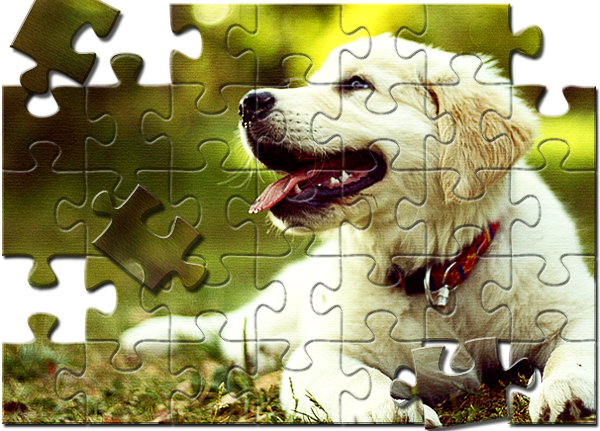
Puzzles are symbolic for many things: an assembly of abstract parts into a cohesive whole, the solving of complex problems, and the combination of perfectly-​​fitting components. These contexts and connotations can be in high demand for designers, so having puzzles as a visual technique can be invaluable. In this tutorial, we’ll turn a photograph into a fun jigsaw puzzle. We’ll make everything from scratch, which will allow a greater control on your final outcome.

Along the way, you will learn the use of pen tool, few layer styling techniques and use of filter. I’ll also demonstrate how you can create your very own jigsaw puzzle pattern by following few easy steps. So, let’s get started!


View Full Tutorial

Saturday, January 5, 2013

When mixing photos, it’s often helpful to use digital painting techniques to help improve your scene. In this tutorial, we will show you how to combine several photos to create a realistic scene of a locomotive passing through a desert landscape. This tutorial will begin as a sketch, we will then show you how to combine photo manipulation and digital painting techniques to create finished artwork that looks amazingly close to the original sketch. Let’s get started!


View Full Tutorial

Sunday, December 23, 2012

Space is vast. Similarly, the range of stunning images of space is vast. I could sit and look through images of nebulae and galaxies for hours and never get bored. But what if we try to make our own space image? Read on to find out how we can fuse a number of techniques to create this beautiful image.


Source

Saturday, December 22, 2012

In the following Quick Tip tutorial you will learn how to use Custom shapes, Ellipse Tool, and Gradients in Photoshop CS5 to create Christmas greeting card with red glowing baubles. You can use these techniques and elements to create your own greeting card! Layered PSD file included. Let’s get started!

Final Image Preview


Source

Thursday, December 20, 2012

Illustrator tutorial, I will highlight the steps I required to produce a special, Dark Surreal Photo Manipulation with Nebula Effect in Illustrator. It is really an intermediate level tutorial so some steps could be a little tricky, why not have access to a go

On the way, we are with a couple simple retouch abilities, in addition to some custom brushes and also the liquify filter to create special effect.

Order card printing online printing companies, like Following Day Flyers.

This is a preview from the final effect I’ve with this tutorial: (click to enlarge)

You are able to download the PSD Apply for this tutorial through the Very important personel People Position for only $6.95/Month (or less)! You won’t just understand this PSD File, but additionally 70+ other PSD Files + Extra Treats + Exclusive Illustrator lessons there. Signup now and obtain exclusive Find out much more about the Very important personel People Areas


Source
HTML and css forms. HTML is Hypertext Markup Language that is used to structure and present content in a website. HTML was first created in 1990 and since then, the language has grown with its advanced versions. HTML 5 is the latest version of HTML and is in popular use among designers and developers. CSS on the other hand is Cascading Style Sheets that is used to describe semantic presentation of a document which is written in some markup language. CSS is most popularly applied for HTML, XML, XHTML and more. Using HTML and CSS working forms, designers can create host of designs for websites along with various web elements. There are also various free HTML and CSS working forms that allow you to create interesting forms, buttons and various other templates with ease. One more fact that is valid here is, when free tools are available, one can grab them for usage and put the rest of hours for some other creative products. Thus, designers can choose the best one from free HTML and CSS working forms and use them towards creating some user friendly and attractive website design. You can avail free HTML & CSS working forms from various sources available in the web world. Here is a display of 50 free HTML & CSS working forms that will help you towards your design work. Explore this gallery of 50 free HTML & CSS working forms and get started with creating interactive designs.


In this tutorial we’ll create a realistic 3D text scene using Photoshop with a little help from Illustrator for the 3D text.
 
You need to have medium to advanced knowledge of Photoshop in order to complete this tutorial.

To get started, go ahead and download all the images used from the Sxh.hu website. All images are free to download and here are the links: 1, 2, 3, 4
Let’s get started and create a truly awesome 3D effect in just a few short steps. Try it out and feel free to post links to your own variations, we’d love to see what you come up with.

Here’s a quick preview of the image that we will be creating:


Source

Saturday, December 8, 2012

In this tutorial I’ll show you how to create a Dark dreamy emotional photo manipulation. We’ll come through techniques of manipulating, retouching, layer mask, adjusting light and shadow as well as other several techniques.

 Source